Play Minehut on Bedrock Edition
Connect from your phone, tablet, or PC — free, with full Java crossplay through Geyser.
Port 19132 · Java players use mc.minehut.com
Watch how to add the Minehut Bedrock address on iOS, Android, or Windows.
What is Bedrock on Minehut?
Bedrock servers on Minehut accept connections from Minecraft Bedrock Edition on iOS, Android, and Windows 10/11 — over the Geyser crossplay bridge. Consoles (Xbox, PlayStation, Nintendo Switch) aren't supported.
- Connect at bedrock.minehut.com:19132. Add the address in Minecraft Bedrock's Servers tab on a supported device. Same lobby, same /server <name> flow as Java.
- Mobile and PC. iOS, Android (phones and tablets), and Windows Bedrock — all reach the network through one address. Consoles aren't supported.
- Crossplay with Java via Geyser. Geyser bridges Bedrock players onto Java servers, so most Minehut Java communities accept Bedrock players out of the box.
- No separate account needed. Your Microsoft account works for both editions — same gamertag, same friends list, no extra signup to join Minehut.
- Mod content stays Java-only. Java mods like Cobblemon and Pixelmon don't render on Bedrock clients, but vanilla, SMP, PvP, minigames, and most plugin servers work fine.
Connect to Minehut on Bedrock
The steps are the same on every device — only how you open Minecraft differs.
- 1
Open Minecraft and tap Play
Launch Minecraft Bedrock Edition on your device and tap Play from the main menu.
- 2
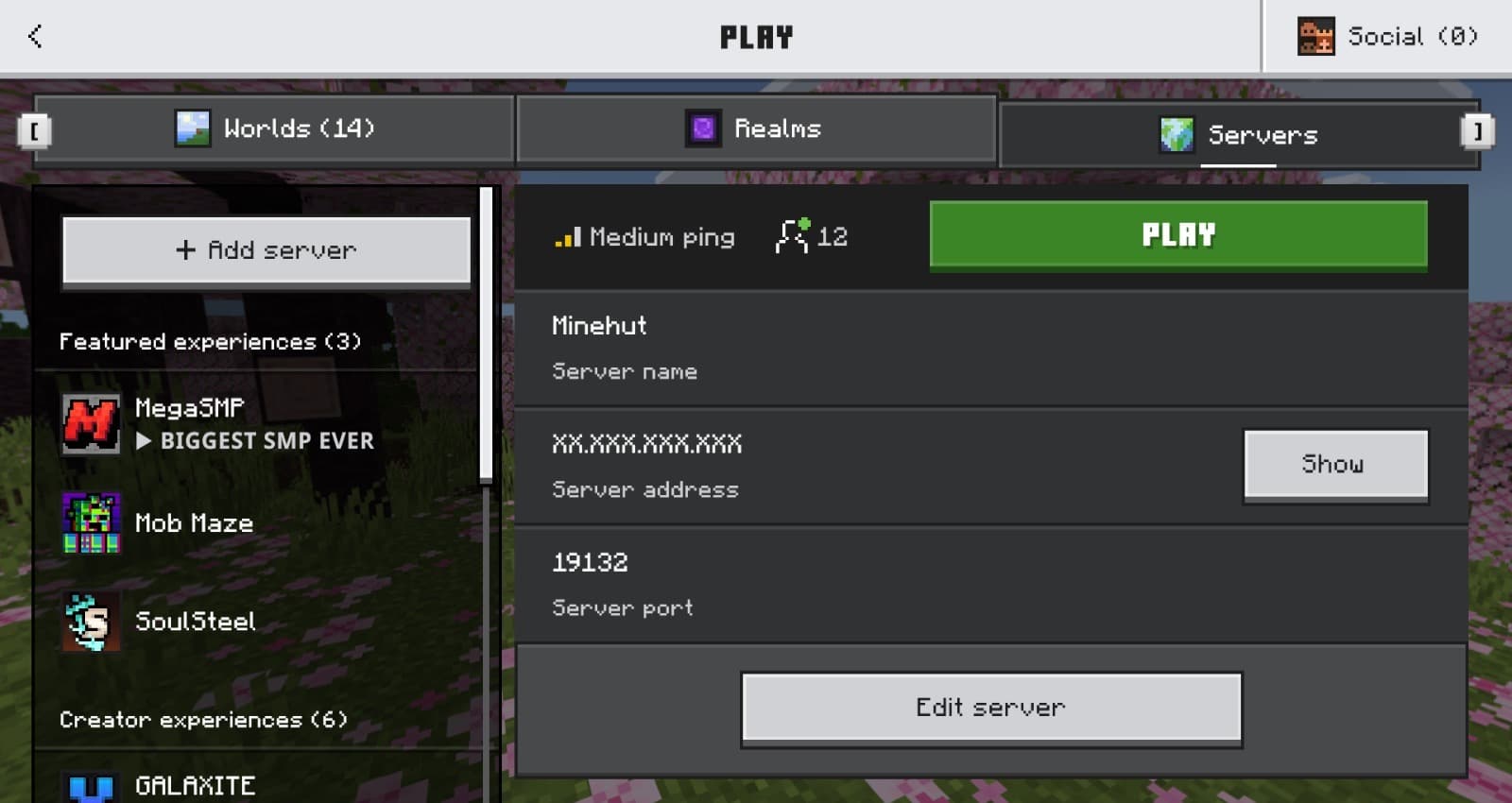
Open the Servers tab and Add Server
Switch to the Servers tab, then tap Add Server to enter a new connection.
- 3
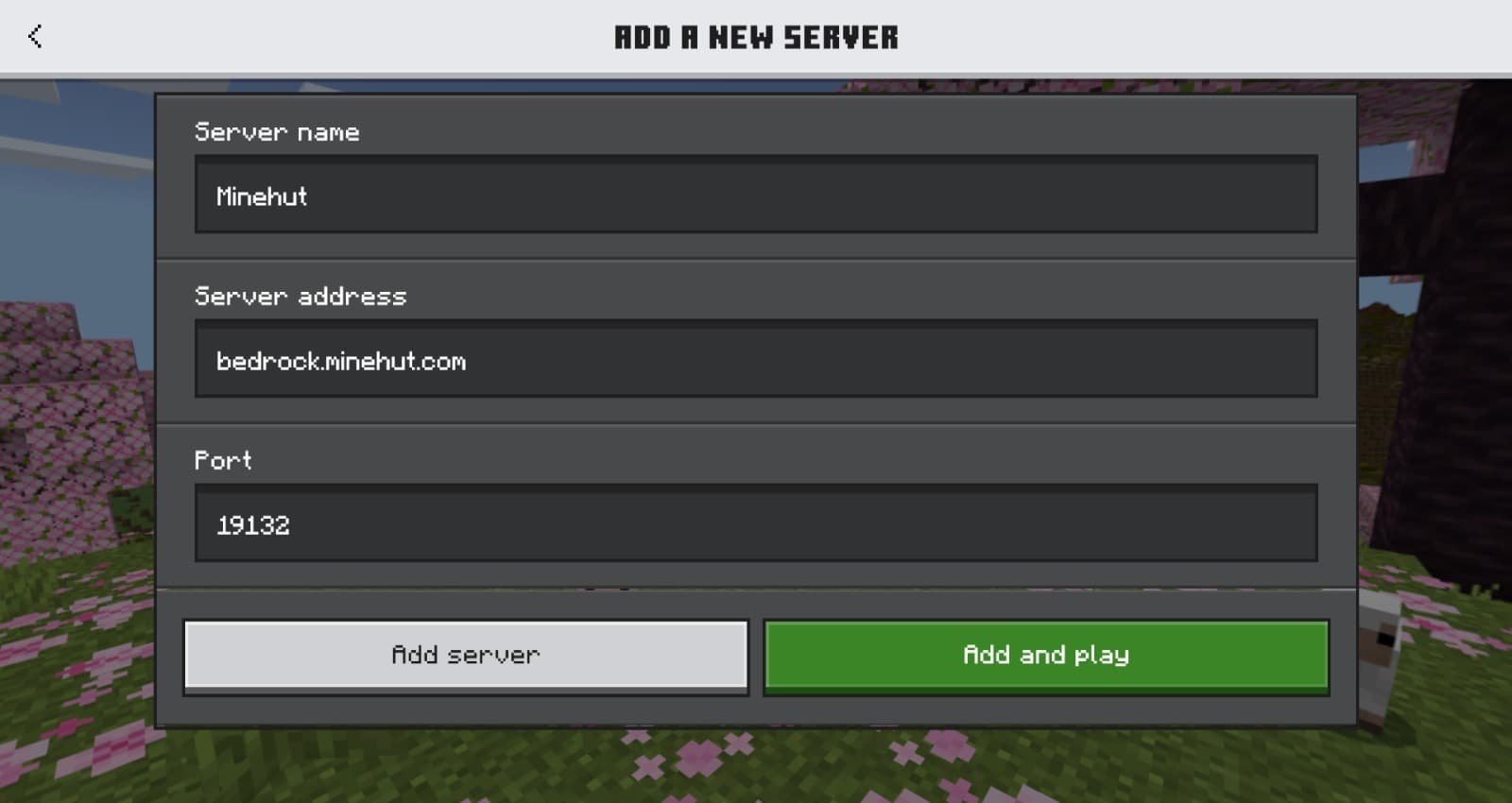
Enter the Minehut details
Server Name: Minehut. Server Address: bedrock.minehut.com. Port: 19132. Then tap Save.
- 4
Join and pick a server
Join Minehut from your server list, then run /server <name> in the lobby to hop onto any server in the network.
By platform
iOS & Android
Open the Minecraft app, tap Play, and follow the steps above. Works on phones and tablets.
Windows 10/11
Launch Minecraft for Windows (Bedrock), click Play, and follow the steps above.
How do I find my server's Bedrock address?
Every Minehut server has a Bedrock address derived from its Java one: insert .bedrock before minehut. So example.minehut.gg becomes example.bedrock.minehut.gg, on port 19132.
Frequently asked questions
How do I join a Bedrock server on Minehut?
Open Minecraft Bedrock Edition on iOS, Android, or Windows 10/11, go to the Servers tab, tap Add Server, and enter bedrock.minehut.com with port 19132. Once you're in the Minehut lobby, run /server <name> to pick a server.
Can I play Minehut on my phone?
Yes. Minecraft Bedrock Edition runs on iOS and Android, and both can connect to bedrock.minehut.com on port 19132. The full Minehut network — SMP, PvP, minigames, Lifesteal — is reachable from mobile.
Can Bedrock players join Java servers?
Yes. Minehut runs the Geyser crossplay bridge, so Bedrock players on bedrock.minehut.com can join most Java servers in the network. The main exception is Java-only mod content (like Cobblemon or Pixelmon), which doesn't render on Bedrock clients.
Are Bedrock servers on Minehut free?
Yes. Every Bedrock-compatible server here is free to play. You only need a legitimate Minecraft Bedrock or Java account — both work across the network.
Can I play Minehut on Xbox, PlayStation, or Nintendo Switch?
Not at the moment. Minehut Bedrock supports iOS, Android, and Windows 10/11 — console editions of Minecraft don't allow adding custom servers in the Servers tab, and Minehut doesn't currently support connecting from consoles.