Play Minehut on Java Edition
Connect from the Minecraft Java launcher on Windows, macOS, or Linux — free, with a whole network of servers just a /join away.
Browse the full server list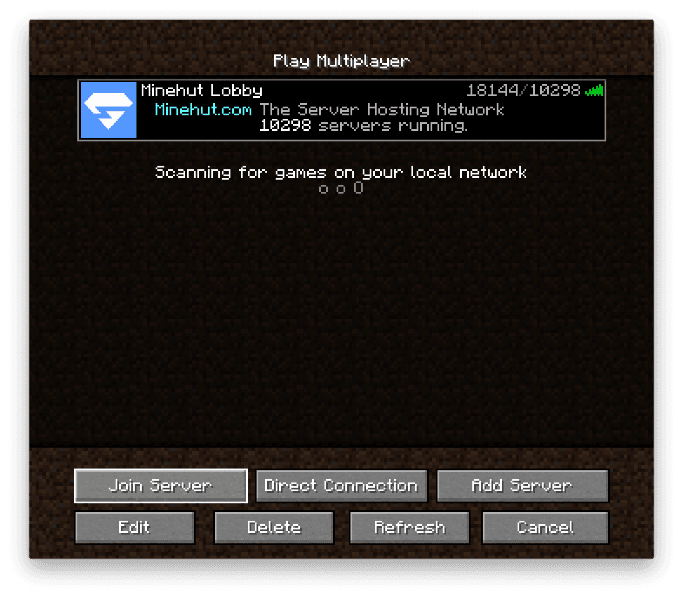
Add mc.minehut.com in Minecraft's Multiplayer screen to reach the Minehut Lobby.
What is Minehut on Java?
Minehut is free Minecraft server hosting with a huge network of community servers you reach from one address. Connect to the Minehut Lobby on Java Edition at mc.minehut.com, then jump into any server — SMP, Factions, Prison, Skyblock, PvP, minigames, and more — with a single /join command.
- Connect at mc.minehut.com. Add the address in Minecraft Java's Multiplayer screen. One address gets you the whole network.
- Thousands of free servers. SMP, Factions, Prison, Skyblock, Gens, minigames, and more — all reachable from the Lobby with /join <name>, or browse the full server list on the Minehut website.
- Crossplay with Bedrock via Geyser. Most Java servers also accept Bedrock players, so you can play with friends on phones, tablets, and Windows.
- Enable resource packs. Set Server Resource Packs to Enabled so custom server textures and menus load correctly.
- Free with a Java account. You just need a legitimate Minecraft: Java Edition account — no extra signup to play on Minehut.
Connect to Minehut on Java
Add the Minehut Lobby once, then hop into any server with /join.
- 1
Open Multiplayer and Add Server
Launch Minecraft: Java Edition from the official launcher, click Multiplayer on the main menu, then click Add Server.
- 2
Enter the Minehut Lobby details
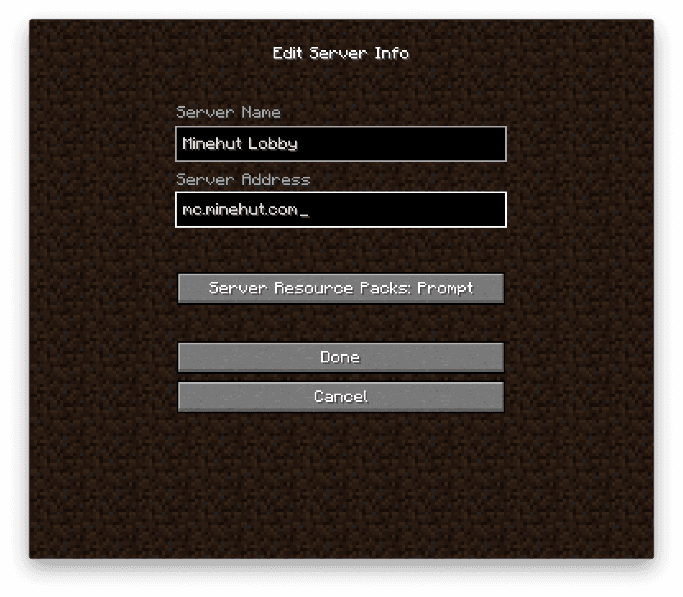
Server Name: Minehut Lobby. Server Address: mc.minehut.com. Set Server Resource Packs to Enabled, then click Done.
- 3
Join and pick a server
Select Minehut Lobby and click Join Server. In the lobby, run /join <name> to jump onto any server — /join even starts it up for you if it's asleep, so you're never stuck at an offline server. Browse the full server list on the Minehut website to find your next one.
How do I find my server's Java address?
Every Minehut server has its own Java address. A server named example gets example.minehut.gg — enter that as the Server Address to connect directly, or join the Lobby at mc.minehut.com and run /join example.
Frequently asked questions
How do I join Minehut on Java Edition?
Open Minecraft: Java Edition, click Multiplayer, then Add Server, and enter mc.minehut.com as the Server Address. Join the Minehut Lobby, then run /join <name> to hop onto any server in the network. You can also browse the full server list on the Minehut website.
Do I need a Minecraft Java account?
Yes — you need a legitimate Minecraft: Java Edition account (a Microsoft account that owns Java Edition). Once you own Java Edition, playing on Minehut is free.
Is Minehut free on Java?
Yes. Every server on the Minehut network is free to play. You only need your own Minecraft: Java Edition account.
Can I play with friends on Bedrock?
Yes. Minehut runs the Geyser crossplay bridge, so most Java servers also accept Bedrock players connecting at bedrock.minehut.com. Java-only mod content (like Cobblemon or Pixelmon) won't render for Bedrock players, but SMP, PvP, and minigame servers work cross-edition.
What Minecraft version do I need?
Minehut supports a wide range of Java versions through ViaVersion, so recent releases connect fine. For the smoothest experience, use the latest stable Minecraft: Java Edition release.